Well, it'd be really surprising to have me write something like this, but I really am looking through the window. I can have a look at the life outside the Code.
What I really mean by Life outside the Code? Well, it means everything... I can take a break from my regular routines and do something else. Plus, that simply means I won't be touching the programming at all for the few next days...
Let's just try out the Life outside the Code. Shall we?

GML: PerformR! New Visual Treat
Some images to demonstrate how exactly you can product the high quality visuals using PerformR! These images are taken using a built in Screenshot mechanism but you can use any third party tool like Fraps, ScreenCapture or CamStudio.
Now that I might get to work on the next version, probably improving the graphics functionality, some more visuals are likely to get added. But the file size would increase. I may not be able to keep the file size below 10 mb. So, probably releases will not be that frequent.


Now that I might get to work on the next version, probably improving the graphics functionality, some more visuals are likely to get added. But the file size would increase. I may not be able to keep the file size below 10 mb. So, probably releases will not be that frequent.


GML: New version of PerformR!
Hey, just to let you guys know... the version of PerformR! is here...
This version contains nothing new except some new sounds and a switching system.
You can press 1 or 2 on keyboard (not Keypad) to use either distorted guitar or bass guitar, yet, you still need to enable the sounds by pressing Space once.
The Low Pitch variations have been removed after I found a small bug in the codes that wrote for them. So, this one only has single set of seven notes one for Distorted and one for Bass.
The graphics part is exactly same as before. Nothing changed there, though.
More sounds will be coming up very soon. Stay tuned.
And Download Link - Click Here -
This version contains nothing new except some new sounds and a switching system.
You can press 1 or 2 on keyboard (not Keypad) to use either distorted guitar or bass guitar, yet, you still need to enable the sounds by pressing Space once.
The Low Pitch variations have been removed after I found a small bug in the codes that wrote for them. So, this one only has single set of seven notes one for Distorted and one for Bass.
The graphics part is exactly same as before. Nothing changed there, though.
More sounds will be coming up very soon. Stay tuned.
And Download Link - Click Here -
GML: PerformR! How to Rock the Show...
Well, I have said a lot about PerformR! but didn't say anything about how to use it... Well, also this is the 60th post of the blog. So, I'll just explain a few basics.
Firstly, Make sure that your keyboard is tough and sturdy, as you'll be pressing a lot of buttons so fast so just to make sure that all goes well.
Then, most importantly, turn off the sticky keys. Cause you'll be pressing Shift, Enter and Backspace for quite a while and that can trigger the annoying sticky keys.
Then, when you're all set and ready to go... Pick up your keyboard and hold it exactly like the image below...
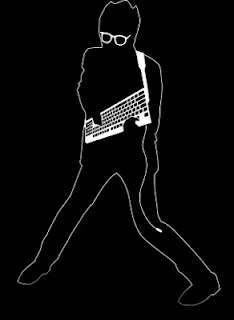
That should give you the optimum hand placement for the Performing. Now you can use your left hand to hold down either of F1, F2, F3 or F4 or even multiple keys and use Enter to set off a burst of particles from the center particle. So, it's exactly like playing a guitar... You can hold down the chords and pick with right hand.
Plus, you can also use Shift key to catch a beat. When shift is pressed, it will emit a ring of effect from every primary particle on the screen, it gives you a great effect of rhythm or beat. You can also hold down the Shift key and then whenever you press Enter, it will create rings effects plus particle burst at the same time. It's a great effect to catch up on the Bass Guitar or Acoustic Guitar.
Plus, Backspace gives you a screenful of effects. It will create a burst of secondary particles from every primary particle drawn on the screen. This may be alittle hard on memory but I'm sure that you guys have a lot better machines than I do. So, using Backspace will allow you cause much more effects on the screen, probably great for catching the Overdrive effects.
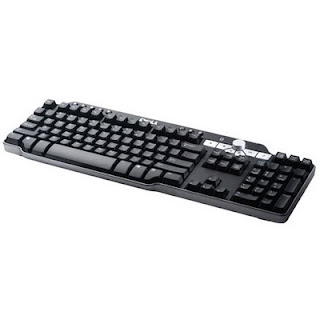 Most of advanced keyboards will be useless for you to do this trick. You'll better have to get a multimedia keyboard to do it. Cause you can control the Media player on the fly with multimedia keyboards. Plus make sure that width of the keyboard is also not too much for you to hold it properly.
Well then Enjoy!
Firstly, Make sure that your keyboard is tough and sturdy, as you'll be pressing a lot of buttons so fast so just to make sure that all goes well.
Then, most importantly, turn off the sticky keys. Cause you'll be pressing Shift, Enter and Backspace for quite a while and that can trigger the annoying sticky keys.
Then, when you're all set and ready to go... Pick up your keyboard and hold it exactly like the image below...

That should give you the optimum hand placement for the Performing. Now you can use your left hand to hold down either of F1, F2, F3 or F4 or even multiple keys and use Enter to set off a burst of particles from the center particle. So, it's exactly like playing a guitar... You can hold down the chords and pick with right hand.
Plus, you can also use Shift key to catch a beat. When shift is pressed, it will emit a ring of effect from every primary particle on the screen, it gives you a great effect of rhythm or beat. You can also hold down the Shift key and then whenever you press Enter, it will create rings effects plus particle burst at the same time. It's a great effect to catch up on the Bass Guitar or Acoustic Guitar.
Plus, Backspace gives you a screenful of effects. It will create a burst of secondary particles from every primary particle drawn on the screen. This may be alittle hard on memory but I'm sure that you guys have a lot better machines than I do. So, using Backspace will allow you cause much more effects on the screen, probably great for catching the Overdrive effects.
 Most of advanced keyboards will be useless for you to do this trick. You'll better have to get a multimedia keyboard to do it. Cause you can control the Media player on the fly with multimedia keyboards. Plus make sure that width of the keyboard is also not too much for you to hold it properly.
Well then Enjoy!
GML: New Ideas about Perform-R!
Well, it looks like I kelp you all well up-to-date with Perform-R! progress. And since I have uploaded the latest version that included the sounds as well. You guys should not complain anymore about me not letting a clue about what is going on.. ;)
Well, as I said earlier that I was planning on improvisation of the Perform-R! but haven't got many ideas as in how should I do it. Addition of sounds was a nice idea, but it will force the increment in size and I won't be able to upload bigger files on internet thanks to my slower connection.
But today is different. I have found some clean sounds on Internet and as I already have Audacity, changing pitches is an easy job. So, I'm going to do it today.
As I had already added Overdriven Guitar sounds, I can change the functionality to accommodate for three to four variations that I have already achieved. Hope you guys really like those. Cause I am not a Guitar Player myself, so I don't really know how it works.. So, if I get anything wrong, please don't flame me on. Instead, tell me where I went wrong so that I can improvise and make that right.
That's all for now. Expect a release tomorrow, Okay?
Well, as I said earlier that I was planning on improvisation of the Perform-R! but haven't got many ideas as in how should I do it. Addition of sounds was a nice idea, but it will force the increment in size and I won't be able to upload bigger files on internet thanks to my slower connection.
But today is different. I have found some clean sounds on Internet and as I already have Audacity, changing pitches is an easy job. So, I'm going to do it today.
As I had already added Overdriven Guitar sounds, I can change the functionality to accommodate for three to four variations that I have already achieved. Hope you guys really like those. Cause I am not a Guitar Player myself, so I don't really know how it works.. So, if I get anything wrong, please don't flame me on. Instead, tell me where I went wrong so that I can improvise and make that right.
That's all for now. Expect a release tomorrow, Okay?
GML: The New PerformR! is here, again!
Well, hello again.
This time, I have uploaded a better version of PerformR in a RAR file on Kupax. (Thanks to Neo for the wonderful hosting)
This version changes most of the things. firstly, the way the particles are drawn on the screen. This also changes the way Backspace Key works. Now it creates a secondary level particles that cannot create anymore particles. So, hitting Backspace will create particle burst only from primary particles that are emitted from the center. Also, enables the keys from F5 to F8 to allow same actions as F1 to F4.
The major change is addition of Left and Right Keys functionality. It will instantly add a spin to the particles on screen, allowing you to create stunning visuals and combo up more. It would enhance your already limitless creativity to no ends at all.
Plus. I have added some sounds for testing. Press Space to toggle them On or Off. F2 to F6 will have sounds You can combine your fret keys with ENTER to make sounds. Plus, you can hold down SHIFT to play a lower pitch versions of the notes. Right now, the notes are pretty crappy. If anyone has clean notes, I'd be more than happy to receive them from you. Of course you'll be given credit for the notes.
So, this makes a basic level composer along with great visualizer (which was the primary aim)
I hope you'll definitely enjoy this release. Thanks!
And yes, the Download Link - Click Here -
Enjoy! And some latest screens from the newly improved engine.


This time, I have uploaded a better version of PerformR in a RAR file on Kupax. (Thanks to Neo for the wonderful hosting)
This version changes most of the things. firstly, the way the particles are drawn on the screen. This also changes the way Backspace Key works. Now it creates a secondary level particles that cannot create anymore particles. So, hitting Backspace will create particle burst only from primary particles that are emitted from the center. Also, enables the keys from F5 to F8 to allow same actions as F1 to F4.
The major change is addition of Left and Right Keys functionality. It will instantly add a spin to the particles on screen, allowing you to create stunning visuals and combo up more. It would enhance your already limitless creativity to no ends at all.
Plus. I have added some sounds for testing. Press Space to toggle them On or Off. F2 to F6 will have sounds You can combine your fret keys with ENTER to make sounds. Plus, you can hold down SHIFT to play a lower pitch versions of the notes. Right now, the notes are pretty crappy. If anyone has clean notes, I'd be more than happy to receive them from you. Of course you'll be given credit for the notes.
So, this makes a basic level composer along with great visualizer (which was the primary aim)
I hope you'll definitely enjoy this release. Thanks!
And yes, the Download Link - Click Here -
Enjoy! And some latest screens from the newly improved engine.


GML: PerformR! is Here!
Well, Hello everyone.
I have always wondered that how awesome it would be if you could control the visualizations that come up on the screen during the song being played on Windows Media Player... Or maybe WinAmp. But I did not know much of the programming that time. So I just could not think of a way of doing it.
Later when I saw Guitar Hero games, I was really excited. Thought I could really create something like this on my machine.
But, unfortunately, Interface of Guitar Hero was pretty boring for me. I did not like the idea of hitting notes at timings. It was pretty much defined, unlike what I prefer - The Sandbox mode.
Then, I encountered this Pic on net, and it sparked me up an idea.
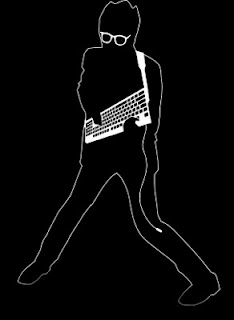
The, I thought that it would be great to create something based on the pic above. I could find the optimum button positions and then I thought of the beats as well. Thankfully the effects systems on GML could really support this one.
I got to work, and brought up the Visualization idea in the front. You are now the performer! You perform on your keyboard to create awesome visualizations for the song that you can leave playing on the background. Or maybe on the headset as well.
If you have a large LCD, you can perform in the house party to shock the guests and show off your talents, or just relax for a while and perform on the songs when You're all alone.
The PerformR guarantees the great performance with best possible graphics with GML to date. Till the new effects library comes up from YoYoGames, this is the best visuals you can get.
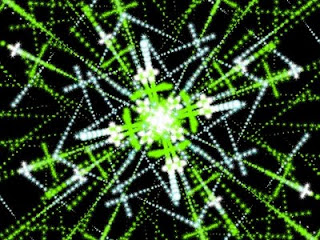
Wanna take a look at what graphical feast you'll get? Look at this...
And yes, the Download link is located on the Top Right corner. Try it out.
Well, and as final words, Make sure that you turn StickyKeys off before playing.
I have always wondered that how awesome it would be if you could control the visualizations that come up on the screen during the song being played on Windows Media Player... Or maybe WinAmp. But I did not know much of the programming that time. So I just could not think of a way of doing it.
Later when I saw Guitar Hero games, I was really excited. Thought I could really create something like this on my machine.
But, unfortunately, Interface of Guitar Hero was pretty boring for me. I did not like the idea of hitting notes at timings. It was pretty much defined, unlike what I prefer - The Sandbox mode.
Then, I encountered this Pic on net, and it sparked me up an idea.

The, I thought that it would be great to create something based on the pic above. I could find the optimum button positions and then I thought of the beats as well. Thankfully the effects systems on GML could really support this one.
I got to work, and brought up the Visualization idea in the front. You are now the performer! You perform on your keyboard to create awesome visualizations for the song that you can leave playing on the background. Or maybe on the headset as well.
If you have a large LCD, you can perform in the house party to shock the guests and show off your talents, or just relax for a while and perform on the songs when You're all alone.
The PerformR guarantees the great performance with best possible graphics with GML to date. Till the new effects library comes up from YoYoGames, this is the best visuals you can get.
Wanna take a look at what graphical feast you'll get? Look at this...

And yes, the Download link is located on the Top Right corner. Try it out.
Well, and as final words, Make sure that you turn StickyKeys off before playing.
Hi and I'm back
Guess what, I got a free time that I can put into my Blogging and some of my projects, so consider me almost back. (Well, not completely and full time as before)
Plus, thankfully, since I have no intension of resuming the work on BftC:R I can devote my time on GML instead and create some new interesting Mini-Games. Now, the puzzle genre really interests me, so I can think some concepts of a new puzzle game using the little extra time I have got.
The very first concept comes to my mind is of the puzzle game with strategy elements. I can make some 2D graphics to make 'em appear real nice and that's what I like.
Plus, some extremely great projectile motion and puzzle elements can turn out interesting. Let's see if I can do something about it.
Plus, thankfully, since I have no intension of resuming the work on BftC:R I can devote my time on GML instead and create some new interesting Mini-Games. Now, the puzzle genre really interests me, so I can think some concepts of a new puzzle game using the little extra time I have got.
The very first concept comes to my mind is of the puzzle game with strategy elements. I can make some 2D graphics to make 'em appear real nice and that's what I like.
Plus, some extremely great projectile motion and puzzle elements can turn out interesting. Let's see if I can do something about it.
Subscribe to:
Posts (Atom)